
Sheet Parts (--includesheetpart)
Choose exactly which parts of a Qlik Sense sheet should be captured for thumbnails and screenshots.
This applies to both Qlik Sense Cloud and Qlik Sense Enterprise on Windows (QSEoW) and is controlled with the --includesheetpart option.
What the values mean
1— Main sheet content only (no sheet title, no selection bar)2— Sheet content + the sheet title3— Sheet content + title + the current selections bar4— Full page, including the top menu/toolbar
Default: 1 (content only).
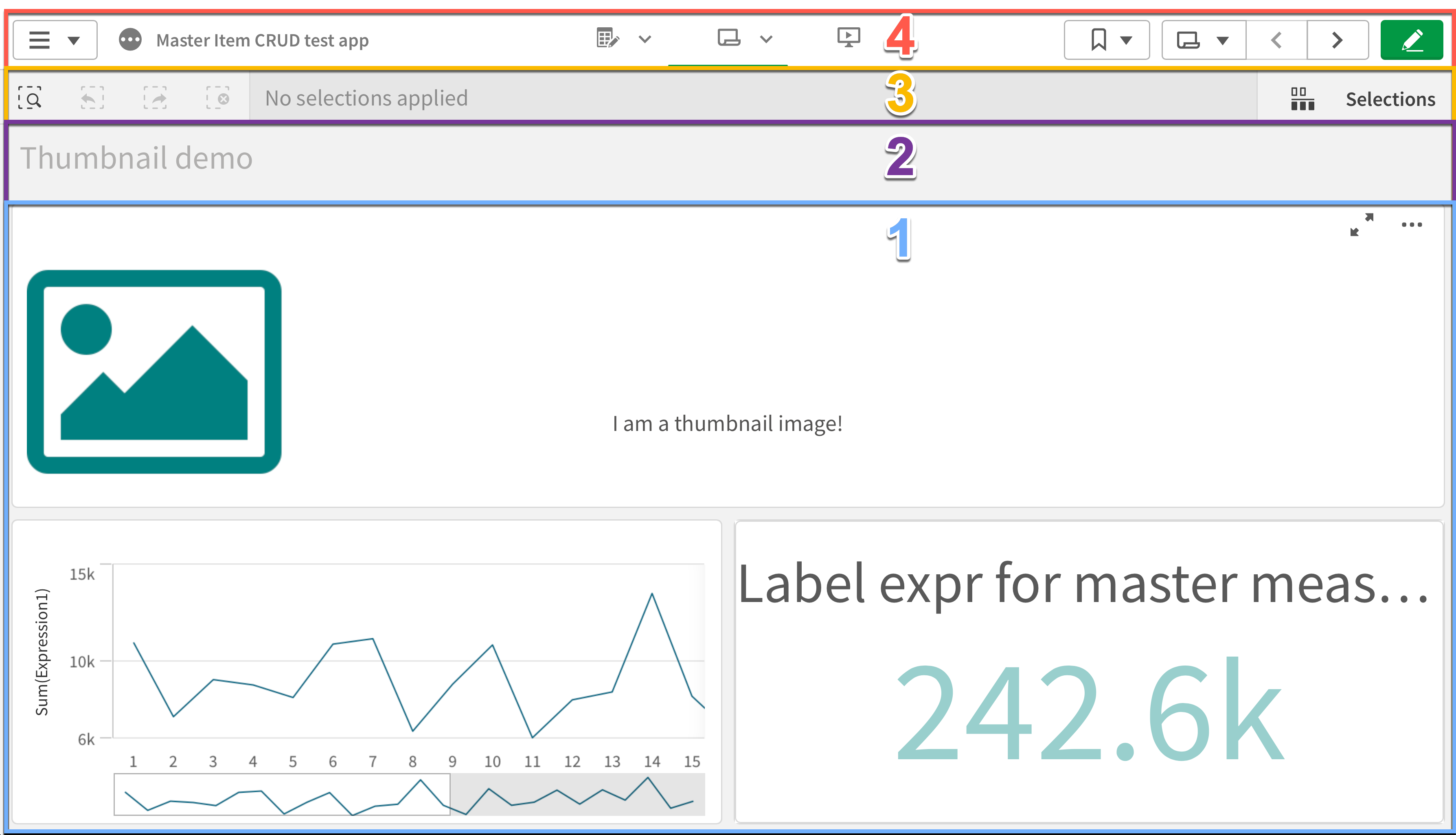
When to use each option
- Pick
1when the visual content should dominate, and titles/selections would distract. - Pick
2when the sheet title adds useful context to the thumbnail. - Pick
3to include the current selections bar, helpful in demos and tutorials. - Pick
4for a complete page view, useful for documentation or audits.
Notes:
- If there are no active selections, the selection bar (part of option
3) may not be visible. - Very small browser windows can affect cropping; see Browser Management for sizing tips.
Examples
QS Cloud
butler-sheet-icons qscloud create-sheet-icons \
  --tenanturl <tenant.eu.qlikcloud.com> \
  --apikey <api-key> \
  --logonuserid <[email protected]m> \
  --logonpwd <password> \
  --appid <app-id> \
--includesheetpart 2butler-sheet-icons qscloud create-sheet-icons `
--tenanturl <tenant.eu.qlikcloud.com> `
--apikey <api-key> `
--logonuserid <[email protected]> `
--logonpwd <password> `
--appid <app-id> `
--includesheetpart 2QSEoW
butler-sheet-icons qseow create-sheet-thumbnails \
  --host <qlik-server.company.com> \
  --apiuserdir Internal \
  --apiuserid sa_api \
  --logonuserdir Internal \
  --logonuserid <username> \
  --logonpwd <password> \
  --sense-version 2024-Nov \
  --appid <app-id> \
--includesheetpart 3butler-sheet-icons qseow create-sheet-thumbnails `
--host <qlik-server.company.com> `
--apiuserdir Internal `
--apiuserid sa_api `
--logonuserdir Internal `
--logonuserid <username> `
--logonpwd <password> `
--sense-version 2024-Nov `
--appid <app-id> `
--includesheetpart 3See also
- QSEoW commands: /reference/qseow
- QS Cloud commands: /reference/qscloud
- Browser management (for debugging and sizing): /guide/concepts/browser-management
- How it works (architecture and flow): /guide/concepts/how-it-works
Valid values are checked before the run starts
Requires BSI 4.1.0 or later
In earlier versions an invalid value was accepted and the run began. The error appeared much later — after certificates were checked, connections opened and the browser started.
--includesheetpart is now validated by the command line itself, so a wrong value costs a second rather than a failed run:
error: option '--includesheetpart <value>' argument '9' is invalid. Allowed choices are 1, 2, 3, 4.The valid values also appear in --help, so they can be found without leaving the terminal. They differ between the two back ends, which is deliberate rather than an oversight:
| Command | Valid values |
|---|---|
qseow create-sheet-thumbnails | 1, 2, 3, 4 |
qscloud create-sheet-thumbnails | 1, 2, 4 — 3 (selection bar) has no Qlik Sense Cloud equivalent |
The same check applies to values supplied through BSI_QSEOW_CST_INCLUDE_SHEET_PART and BSI_QSCLOUD_CST_INCLUDE_SHEET_PART, with a message naming the variable the value came from.