
QSEoW Examples
Real-world examples of using Butler Sheet Icons with Qlik Sense Enterprise on Windows (QSEoW) across different platforms and scenarios.
Basic Single App Update
Update sheet icons for a specific QSEoW app:
./butler-sheet-icons qseow create-sheet-thumbnails \
  --host qlik-server.company.com \
  --appid a3e0f5d2-000a-464f-998d-33d333b175d7 \
  --apiuserdir Internal \
  --apiuserid sa_api \
  --logonuserdir Internal \
  --logonuserid your-username \
  --logonpwd your-password \
  --prefix form \
  --sense-version 2024-Nov \
--contentlibrary "Butler sheet thumbnails".\butler-sheet-icons.exe qseow create-sheet-thumbnails `
--host qlik-server.company.com `
--appid a3e0f5d2-000a-464f-998d-33d333b175d7 `
--apiuserdir Internal `
--apiuserid sa_api `
--logonuserdir Internal `
--logonuserid your-username `
--logonpwd your-password `
--prefix form `
--sense-version 2024-Nov `
--contentlibrary "Butler sheet thumbnails"Example Output
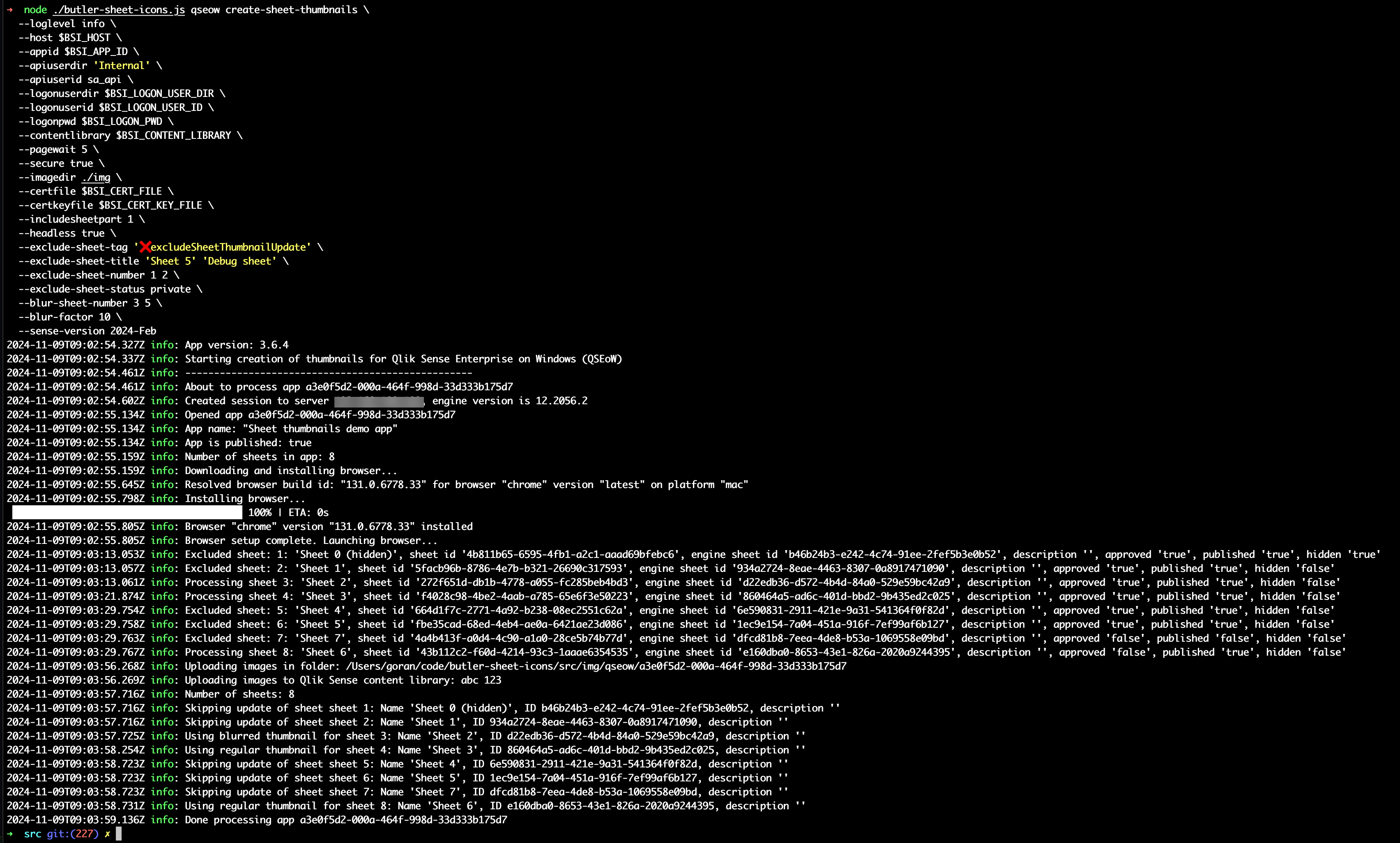
Here's Butler Sheet Icons running on macOS, connecting to a QSEoW server:
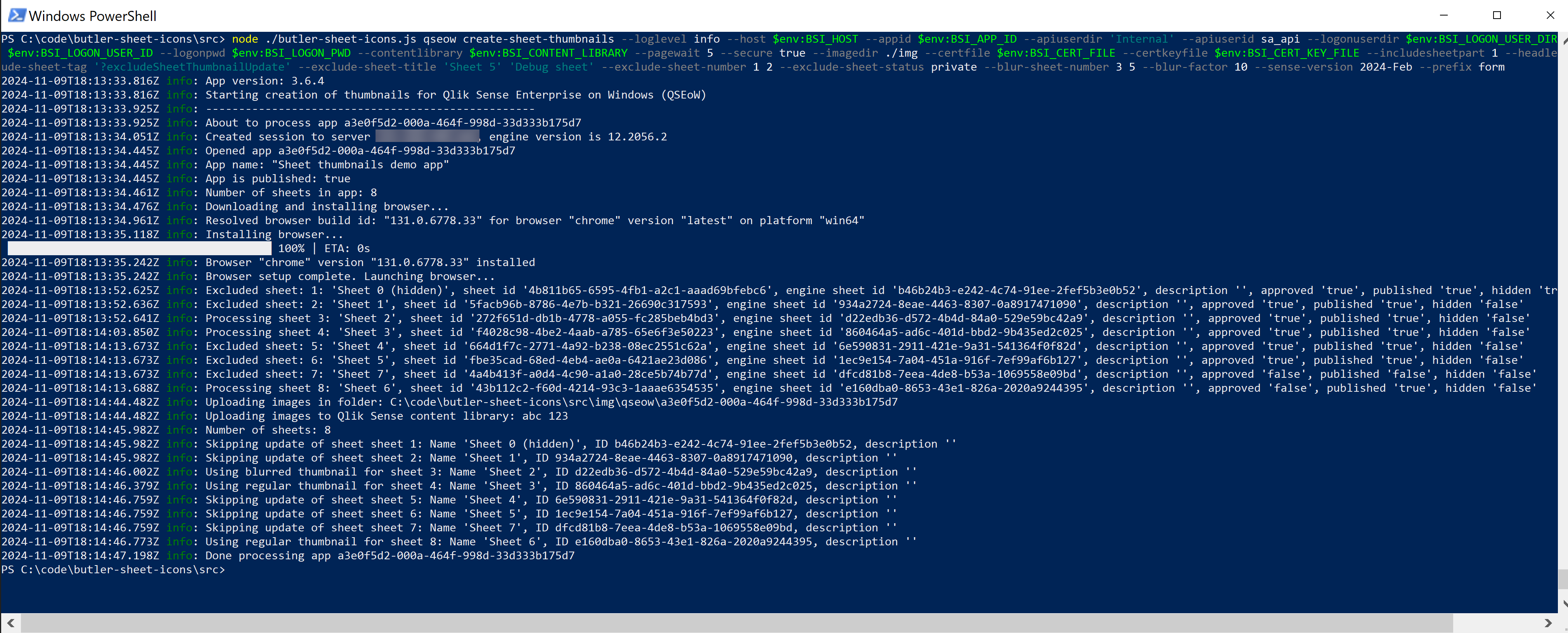
And here's the same operation on Windows:
Tag-Based Bulk Update
Update all apps with a specific tag, applying advanced filtering:
./butler-sheet-icons qseow create-sheet-thumbnails \
  --host qlik-server.company.com \
  --apiuserdir Internal \
  --apiuserid sa_api \
  --logonuserdir Internal \
  --logonuserid your-username \
  --logonpwd your-password \
  --prefix form \
  --sense-version 2024-Nov \
  --qliksensetag "updateSheetThumbnails" \
  --exclude-sheet-tag "excludeFromThumbnails" \
  --exclude-sheet-number 1 2 \
  --exclude-sheet-title "Intro" "Definitions" "Help" \
  --exclude-sheet-status private \
  --blur-sheet-number 3 5 \
  --blur-sheet-title "Financial Dashboard" \
  --blur-factor 10 \
  --contentlibrary "Butler sheet thumbnails" \
  --pagewait 5 \
  --imagedir ./img \
  --includesheetpart 2 \
--headless true.\butler-sheet-icons.exe qseow create-sheet-thumbnails `
--host qlik-server.company.com `
--apiuserdir Internal `
--apiuserid sa_api `
--logonuserdir Internal `
--logonuserid your-username `
--logonpwd your-password `
--prefix form `
--sense-version 2024-Nov `
--qliksensetag "updateSheetThumbnails" `
--exclude-sheet-tag "excludeFromThumbnails" `
--exclude-sheet-number 1 2 `
--exclude-sheet-title "Intro" "Definitions" "Help" `
--exclude-sheet-status private `
--blur-sheet-number 3 5 `
--blur-sheet-title "Financial Dashboard" `
--blur-factor 10 `
--contentlibrary "Butler sheet thumbnails" `
--pagewait 5 `
--imagedir .\img `
--includesheetpart 2 `
--headless trueEnvironment Variables Example
For security and reusability, use environment variables:
# Set environment variables for QSEoW
$env:BSI_QSEOW_CST_HOST = 'qlik-server.company.com'
$env:BSI_QSEOW_CST_API_USER_DIR = 'Internal'
$env:BSI_QSEOW_CST_API_USER_ID = 'sa_api'
$env:BSI_QSEOW_CST_LOGON_USER_DIR = 'Internal'
$env:BSI_QSEOW_CST_LOGON_USER_ID = 'your-username'
$env:BSI_QSEOW_CST_LOGON_PWD = 'your-password'
$env:BSI_QSEOW_CST_PREFIX = 'form'
$env:BSI_QSEOW_CST_SENSE_VERSION = '2024-Nov'
$env:BSI_QSEOW_CST_CONTENT_LIBRARY = 'Butler sheet thumbnails'

# Run with minimal command line parameters
.\butler-sheet-icons.exe qseow create-sheet-thumbnails --appid a3e0f5d2-000a-464f-998d-33d333b175d7# Set environment variables for QSEoW
export BSI_QSEOW_CST_HOST='qlik-server.company.com'
export BSI_QSEOW_CST_API_USER_DIR='Internal'
export BSI_QSEOW_CST_API_USER_ID='sa_api'
export BSI_QSEOW_CST_LOGON_USER_DIR='Internal'
export BSI_QSEOW_CST_LOGON_USER_ID='your-username'
export BSI_QSEOW_CST_LOGON_PWD='your-password'
export BSI_QSEOW_CST_PREFIX='form'
export BSI_QSEOW_CST_SENSE_VERSION='2024-Nov'
export BSI_QSEOW_CST_CONTENT_LIBRARY='Butler sheet thumbnails'
# Run with minimal command line parameters
./butler-sheet-icons qseow create-sheet-thumbnails --appid a3e0f5d2-000a-464f-998d-33d333b175d7Advanced Sheet Filtering
Complex filtering scenarios for enterprise environments:
Exclude Development Sheets
./butler-sheet-icons qseow create-sheet-thumbnails \
  --host qlik-server.company.com \
  --appid a3e0f5d2-000a-464f-998d-33d333b175d7 \
  --apiuserdir Internal \
  --apiuserid sa_api \
  --logonuserdir Internal \
  --logonuserid your-username \
  --logonpwd your-password \
  --prefix form \
  --sense-version 2024-Nov \
  --exclude-sheet-status private \
  --exclude-sheet-tag "development" "test" \
  --exclude-sheet-title "Debug" "Test Sheet" "Sandbox" \
--contentlibrary "Butler sheet thumbnails".\butler-sheet-icons.exe qseow create-sheet-thumbnails `
--host qlik-server.company.com `
--appid a3e0f5d2-000a-464f-998d-33d333b175d7 `
--apiuserdir Internal `
--apiuserid sa_api `
--logonuserdir Internal `
--logonuserid your-username `
--logonpwd your-password `
--prefix form `
--sense-version 2024-Nov `
--exclude-sheet-status private `
--exclude-sheet-tag "development" "test" `
--exclude-sheet-title "Debug" "Test Sheet" "Sandbox" `
--contentlibrary "Butler sheet thumbnails"Blur Sensitive Content
./butler-sheet-icons qseow create-sheet-thumbnails \
  --host qlik-server.company.com \
  --qliksensetag "production-apps" \
  --apiuserdir Internal \
  --apiuserid sa_api \
  --logonuserdir Internal \
  --logonuserid your-username \
  --logonpwd your-password \
  --prefix form \
  --sense-version 2024-May \
  --blur-sheet-tag "sensitive" "confidential" \
  --blur-sheet-title "Financial Summary" "Executive Dashboard" \
  --blur-factor 15 \
  --exclude-sheet-status private \
  --contentlibrary "Butler sheet thumbnails" \
--pagewait 7.\butler-sheet-icons.exe qseow create-sheet-thumbnails `
--host qlik-server.company.com `
--qliksensetag "production-apps" `
--apiuserdir Internal `
--apiuserid sa_api `
--logonuserdir Internal `
--logonuserid your-username `
--logonpwd your-password `
--prefix form `
--sense-version 2024-May `
--blur-sheet-tag "sensitive" "confidential" `
--blur-sheet-title "Financial Summary" "Executive Dashboard" `
--blur-factor 15 `
--exclude-sheet-status private `
--contentlibrary "Butler sheet thumbnails" `
--pagewait 7Different Sheet Parts
Control which part of sheets to include in thumbnails:
Sheet Content Only
./butler-sheet-icons qseow create-sheet-thumbnails \
  --host qlik-server.company.com \
  --appid a3e0f5d2-000a-464f-998d-33d333b175d7 \
  --includesheetpart 1 \
--sense-version 2024-Nov.\butler-sheet-icons.exe qseow create-sheet-thumbnails `
--host qlik-server.company.com `
--appid a3e0f5d2-000a-464f-998d-33d333b175d7 `
--includesheetpart 1 `
--sense-version 2024-NovContent + Title
./butler-sheet-icons qseow create-sheet-thumbnails \
  --host qlik-server.company.com \
  --appid a3e0f5d2-000a-464f-998d-33d333b175d7 \
  --includesheetpart 2 \
--sense-version 2024-Nov.\butler-sheet-icons.exe qseow create-sheet-thumbnails `
--host qlik-server.company.com `
--appid a3e0f5d2-000a-464f-998d-33d333b175d7 `
--includesheetpart 2 `
--sense-version 2024-NovFull Page
./butler-sheet-icons qseow create-sheet-thumbnails \
  --host qlik-server.company.com \
  --appid a3e0f5d2-000a-464f-998d-33d333b175d7 \
  --includesheetpart 4 \
--sense-version 2024-Nov.\butler-sheet-icons.exe qseow create-sheet-thumbnails `
--host qlik-server.company.com `
--appid a3e0f5d2-000a-464f-998d-33d333b175d7 `
--includesheetpart 4 `
--sense-version 2024-NovCertificate Management
Default Certificate Location
# Expected directory structure:
your-project/
├── butler-sheet-icons.exe
├── cert/
│   ├── client.pem
│   └── client_key.pem
└── img/                     # Created automatically
Command (certificates found automatically):
./butler-sheet-icons qseow create-sheet-thumbnails \
  --host qlik-server.company.com \
  --appid a3e0f5d2-000a-464f-998d-33d333b175d7 \
--sense-version 2024-Nov.\butler-sheet-icons.exe qseow create-sheet-thumbnails `
--host qlik-server.company.com `
--appid a3e0f5d2-000a-464f-998d-33d333b175d7 `
--sense-version 2024-NovCustom Certificate Paths
./butler-sheet-icons qseow create-sheet-thumbnails \
  --host qlik-server.company.com \
  --appid a3e0f5d2-000a-464f-998d-33d333b175d7 \
  --certfile /path/to/custom/client.pem \
  --certkeyfile /path/to/custom/client_key.pem \
--sense-version 2024-Nov.\butler-sheet-icons.exe qseow create-sheet-thumbnails `
--host qlik-server.company.com `
--appid a3e0f5d2-000a-464f-998d-33d333b175d7 `
--certfile .\cert\client.pem `
--certkeyfile .\cert\client_key.pem `
--sense-version 2024-NovContent Library Management
Using Default Library
./butler-sheet-icons qseow create-sheet-thumbnails \
  --host qlik-server.company.com \
  --appid a3e0f5d2-000a-464f-998d-33d333b175d7 \
  --contentlibrary "Butler sheet thumbnails" \
--sense-version 2024-Nov.\butler-sheet-icons.exe qseow create-sheet-thumbnails `
--host qlik-server.company.com `
--appid a3e0f5d2-000a-464f-998d-33d333b175d7 `
--contentlibrary "Butler sheet thumbnails" `
--sense-version 2024-NovCustom Content Library
./butler-sheet-icons qseow create-sheet-thumbnails \
  --host qlik-server.company.com \
  --appid a3e0f5d2-000a-464f-998d-33d333b175d7 \
  --contentlibrary "My Custom Thumbnails" \
--sense-version 2024-Nov.\butler-sheet-icons.exe qseow create-sheet-thumbnails `
--host qlik-server.company.com `
--appid a3e0f5d2-000a-464f-998d-33d333b175d7 `
--contentlibrary "My Custom Thumbnails" `
--sense-version 2024-NovRemoving Sheet Icons
Remove all sheet icons from a specific app:
./butler-sheet-icons qseow remove-sheet-icons \
  --host qlik-server.company.com \
  --appid a3e0f5d2-000a-464f-998d-33d333b175d7 \
  --apiuserdir Internal \
  --apiuserid sa_api \
  --certfile ./cert/client.pem \
--certkeyfile ./cert/client_key.pem.\butler-sheet-icons.exe qseow remove-sheet-icons `
--host qlik-server.company.com `
--appid a3e0f5d2-000a-464f-998d-33d333b175d7 `
--apiuserdir Internal `
--apiuserid sa_api `
--certfile .\cert\client.pem `
--certkeyfile .\cert\client_key.pemRemove from all apps with a tag:
./butler-sheet-icons qseow remove-sheet-icons \
  --host qlik-server.company.com \
  --qliksensetag "remove-thumbnails" \
  --apiuserdir Internal \
  --apiuserid sa_api \
  --certfile ./cert/client.pem \
--certkeyfile ./cert/client_key.pem.\butler-sheet-icons.exe qseow remove-sheet-icons `
--host qlik-server.company.com `
--qliksensetag "remove-thumbnails" `
--apiuserdir Internal `
--apiuserid sa_api `
--certfile .\cert\client.pem `
--certkeyfile .\cert\client_key.pemVersion-Specific Examples
QSEoW 2024-Nov
./butler-sheet-icons qseow create-sheet-thumbnails \
  --host qlik-server.company.com \
--sense-version 2024-Nov.\butler-sheet-icons.exe qseow create-sheet-thumbnails `
--host qlik-server.company.com `
--sense-version 2024-NovQSEoW 2023-Nov
./butler-sheet-icons qseow create-sheet-thumbnails \
  --host qlik-server.company.com \
--sense-version 2023-Nov.\butler-sheet-icons.exe qseow create-sheet-thumbnails `
--host qlik-server.company.com `
--sense-version 2023-NovLegacy Versions
./butler-sheet-icons qseow create-sheet-thumbnails \
  --host qlik-server.company.com \
--sense-version pre-2022-Nov.\butler-sheet-icons.exe qseow create-sheet-thumbnails `
--host qlik-server.company.com `
--sense-version pre-2022-NovDevelopment and Testing
Debug Mode with Visible Browser
./butler-sheet-icons qseow create-sheet-thumbnails \
  --host qlik-server.company.com \
  --appid a3e0f5d2-000a-464f-998d-33d333b175d7 \
  --headless false \
  --loglevel debug \
--sense-version 2024-Nov.\butler-sheet-icons.exe qseow create-sheet-thumbnails `
--host qlik-server.company.com `
--appid a3e0f5d2-000a-464f-998d-33d333b175d7 `
--headless false `
--loglevel debug `
--sense-version 2024-NovTest with Single Sheet
./butler-sheet-icons qseow create-sheet-thumbnails \
  --host qlik-server.company.com \
  --appid a3e0f5d2-000a-464f-998d-33d333b175d7 \
  --exclude-sheet-number 2 3 4 5 6 7 8 9 10 \
  --sense-version 2024-Nov \
--pagewait 10.\butler-sheet-icons.exe qseow create-sheet-thumbnails `
--host qlik-server.company.com `
--appid a3e0f5d2-000a-464f-998d-33d333b175d7 `
--exclude-sheet-number 2 3 4 5 6 7 8 9 10 `
--sense-version 2024-Nov `
--pagewait 10Network Configuration
Custom Ports
./butler-sheet-icons qseow create-sheet-thumbnails \
  --host qlik-server.company.com \
  --port 8443 \
  --qrsport 4242 \
  --engineport 4747 \
--sense-version 2024-Nov.\butler-sheet-icons.exe qseow create-sheet-thumbnails `
--host qlik-server.company.com `
--port 8443 `
--qrsport 4242 `
--engineport 4747 `
--sense-version 2024-NovNon-secure Connection (Development)
./butler-sheet-icons qseow create-sheet-thumbnails \
  --host qlik-server.company.com \
  --secure false \
  --port 80 \
--sense-version 2024-Nov.\butler-sheet-icons.exe qseow create-sheet-thumbnails `
--host qlik-server.company.com `
--secure false `
--port 80 `
--sense-version 2024-NovSelf-signed Certificates
./butler-sheet-icons qseow create-sheet-thumbnails \
  --host qlik-server.company.com \
  --rejectUnauthorized false \
--sense-version 2024-Nov.\butler-sheet-icons.exe qseow create-sheet-thumbnails `
--host qlik-server.company.com `
--rejectUnauthorized false `
--sense-version 2024-NovCommon Error Scenarios
Certificate Issues
Error: Unable to load certificate filesSolution:
- Verify certificate files exist in
./cert/directory - Check file permissions
- Ensure certificates were exported correctly from QMC
Authentication Failures
Error: Authentication failedSolutions:
- Verify user credentials are correct
- Check user has appropriate permissions
- Ensure virtual proxy is configured for form authentication
- Try
--prefix formparameter
Version Mismatch
Error: Could not navigate to sheetSolution: Verify --sense-version matches your QSEoW installation
Content Library Missing
Error: Content library not foundSolution: Create the content library in QMC before running Butler Sheet Icons
Tips for Success
Test with Single Apps: Before bulk operations, test with individual apps to verify configuration.
Certificate Security: Store certificates securely and never commit them to version control.
Environment Variables: Use environment variables for credentials to avoid exposing them in command history.
Virtual Proxy Setup: Ensure you have a properly configured virtual proxy with form-based authentication.
Version Compatibility: Always specify the correct
--sense-versionfor your QSEoW installation.Wait Times: Adjust
--pagewaitbased on sheet complexity - complex dashboards may need 7-10 seconds.Content Library Permissions: Ensure the API user has write permissions to the content library.
Tag Management: Use descriptive tags for apps and sheets to enable efficient filtering.
Logging: Use
--loglevel debugfor troubleshooting,--loglevel infofor normal operations.Browser Options: If encountering browser issues, try different versions with
--browserand--browser-version.