
QS Cloud Examples
Real-world examples of using Butler Sheet Icons with Qlik Sense Cloud across different platforms and scenarios.
Basic Single App Update
Update sheet icons for a specific QS Cloud app:
./butler-sheet-icons qscloud create-sheet-icons \
  --tenanturl mytenant.eu.qlikcloud.com \
  --apikey your-api-key-here \
  --logonuserid [email protected] \
  --logonpwd your-password \
--appid 12345678-1234-1234-1234-123456789012.\butler-sheet-icons.exe qscloud create-sheet-icons `
--tenanturl mytenant.eu.qlikcloud.com `
--apikey your-api-key-here `
--logonuserid your-[email protected] `
--logonpwd your-password `
--appid 12345678-1234-1234-1234-123456789012Example Output (Single App)
Here's what the execution looks like on Windows 11 using PowerShell (some parameters redacted):
Click to expand
PS C:\tools\butler-sheet-icons> .\butler-sheet-icons.exe qscloud create-sheet-icons `
>>   --tenanturl mytenant.eu.qlikcloud.com `
>>   --apikey "your-api-key-here" `
>>   --logonuserid your-[email protected] `
>>   --logonpwd your-password `
>>   --appid 12345678-1234-1234-1234-123456789012
2025-09-06T19:41:22.953Z info: App version: 3.8.0
2025-09-06T19:41:22.957Z info: Starting creation of thumbnails for Qlik Sense Cloud
2025-09-06T19:41:22.958Z info: Testing connection to Qlik Sense Cloud...
2025-09-06T19:41:23.495Z info: Connection to tenant mytenant.eu.qlikcloud.com successful.
2025-09-06T19:41:23.496Z info:     Tenant ID : abc123.....
2025-09-06T19:41:23.496Z info:     User name : Göran Sander
2025-09-06T19:41:23.498Z info:     User email: your-[email protected]
2025-09-06T19:41:23.499Z info:     User ID   : def456...
2025-09-06T19:41:23.500Z info: --------------------------------------------------
2025-09-06T19:41:23.501Z info: About to process app 12345678-1234-1234-1234-123456789012
2025-09-06T19:41:26.824Z info: Created session to Qlik Sense Cloud tenant mytenant.eu.qlikcloud.com, engine version is 12.2533.0
2025-09-06T19:41:26.883Z info: Opened app 12345678-1234-1234-1234-123456789012
2025-09-06T19:41:26.883Z info: App name: "Sheet thumbnails demo DEV"
2025-09-06T19:41:26.884Z info: App is published: false
2025-09-06T19:41:26.988Z info: Number of sheets in app: 7
2025-09-06T19:41:26.991Z info: Downloading and installing browser...
2025-09-06T19:41:27.445Z info: Resolved browser build id: "140.0.7339.81" for browser "chrome" version "latest" on platform "win64"
2025-09-06T19:41:27.619Z info: Installing browser...
 ████████████████████████████████████████ 100% | ETA: 0s
2025-09-06T19:41:27.801Z info: Browser "chrome" version "140.0.7339.81" installed
2025-09-06T19:41:27.801Z info: Browser setup complete. Launching browser...
2025-09-06T19:41:50.975Z info: Excluded sheet: 1: 'Sheet 0 (public, hidden)', ID a3694ece-9067-413c-a6a7-85b03c31407b, description '', approved 'false', published 'true', hidden 'true'
2025-09-06T19:41:51.017Z info: Processing sheet 2: 'Sheet 1 (public)', ID 8e8be29d-1336-4971-8a7e-6a626b3d2363, description '', approved 'false', published 'true', hidden 'false'
2025-09-06T19:42:02.370Z info: Processing sheet 3: 'Sheet 2 (public)', ID 5e93a5a8-01e0-485f-8cca-48be2125a979, description '', approved 'false', published 'true', hidden 'false'
2025-09-06T19:42:12.621Z info: Processing sheet 4: 'Sheet 3 (public)', ID e507b714-b000-41c5-9527-c94ad7fb5d00, description '', approved 'false', published 'true', hidden 'false'
2025-09-06T19:42:22.309Z info: Processing sheet 5: 'Sheet 4 (public)', ID 554d91f1-0dea-4f04-ab11-c00986365217, description '', approved 'false', published 'true', hidden 'false'
2025-09-06T19:42:32.566Z info: Processing sheet 6: 'Sheet 5 (public)', ID 0450d9ce-5b9b-4206-9ffb-edc6b1b6e1aa, description '', approved 'false', published 'true', hidden 'false'
2025-09-06T19:42:43.451Z info: Processing sheet 7: 'Sheet 6 (private)', ID 07c30b5c-91b7-4d47-9d17-d8f89dad3bd4, description '', approved 'false', published 'false', hidden 'false'
2025-09-06T19:42:54.013Z info: Uploading images in folder: C:\tools\butler-sheet-icons\img\cloud\12345678-1234-1234-1234-123456789012 to Qlik Sense Cloud app 12345678-1234-1234-1234-123456789012
2025-09-06T19:42:54.015Z info: Uploading file: thumbnail-2.png
2025-09-06T19:42:54.625Z info: Uploading file: thumbnail-3.png
2025-09-06T19:42:55.108Z info: Uploading file: thumbnail-4.png
2025-09-06T19:42:55.459Z info: Uploading file: thumbnail-5.png
2025-09-06T19:42:55.854Z info: Uploading file: thumbnail-6.png
2025-09-06T19:42:56.210Z info: Uploading file: thumbnail-7.png
2025-09-06T19:42:57.141Z info: Number of sheets: 7
2025-09-06T19:42:57.144Z info: Skipping update of sheet 1: Name 'Sheet 0 (public, hidden)', ID a3694ece-9067-413c-a6a7-85b03c31407b, description ''
2025-09-06T19:42:57.227Z info: Using regular thumbnail for sheet 2: 'Sheet 1 (public)', ID 8e8be29d-1336-4971-8a7e-6a626b3d2363, description '', approved 'false', published 'true'
2025-09-06T19:42:57.700Z info: Using regular thumbnail for sheet 3: 'Sheet 2 (public)', ID 5e93a5a8-01e0-485f-8cca-48be2125a979, description '', approved 'false', published 'true'
2025-09-06T19:42:58.103Z info: Using regular thumbnail for sheet 4: 'Sheet 3 (public)', ID e507b714-b000-41c5-9527-c94ad7fb5d00, description '', approved 'false', published 'true'
2025-09-06T19:42:58.505Z info: Using regular thumbnail for sheet 5: 'Sheet 4 (public)', ID 554d91f1-0dea-4f04-ab11-c00986365217, description '', approved 'false', published 'true'
2025-09-06T19:42:58.962Z info: Using regular thumbnail for sheet 6: 'Sheet 5 (public)', ID 0450d9ce-5b9b-4206-9ffb-edc6b1b6e1aa, description '', approved 'false', published 'true'
2025-09-06T19:42:59.366Z info: Using regular thumbnail for sheet 7: 'Sheet 6 (private)', ID 07c30b5c-91b7-4d47-9d17-d8f89dad3bd4, description '', approved 'false', published 'false'
2025-09-06T19:42:59.716Z info: Done processing app 12345678-1234-1234-1234-123456789012
PS C:\tools\butler-sheet-icons>
On macOS:
Click to expand
➜  butler-sheet-icons ./butler-sheet-icons qscloud create-sheet-icons \
  --tenanturl mytenant.eu.qlikcloud.com \
  --apikey your-api-key-here \
  --logonuserid [email protected] \
  --logonpwd wd0sZTZfqeEd20Y \
  --appid 12345678-1234-1234-1234-123456789012
2025-09-06T19:48:06.230Z info: App version: 3.8.0
2025-09-06T19:48:06.234Z info: Starting creation of thumbnails for Qlik Sense Cloud
2025-09-06T19:48:06.234Z info: Testing connection to Qlik Sense Cloud...
2025-09-06T19:48:06.751Z info: Connection to tenant mytenant.eu.qlikcloud.com successful.
2025-09-06T19:48:06.751Z info:     Tenant ID : abc123...
2025-09-06T19:48:06.751Z info:     User name : Göran Sander
2025-09-06T19:48:06.751Z info:     User email: [email protected]
2025-09-06T19:48:06.751Z info:     User ID   : def456...
2025-09-06T19:48:06.751Z info: --------------------------------------------------
2025-09-06T19:48:06.752Z info: About to process app 12345678-1234-1234-1234-123456789012
2025-09-06T19:48:10.091Z info: Created session to Qlik Sense Cloud tenant mytenant.eu.qlikcloud.com, engine version is 12.2533.0
2025-09-06T19:48:10.141Z info: Opened app 12345678-1234-1234-1234-123456789012
2025-09-06T19:48:10.141Z info: App name: "Sheet thumbnails demo DEV"
2025-09-06T19:48:10.141Z info: App is published: false
2025-09-06T19:48:10.230Z info: Number of sheets in app: 7
2025-09-06T19:48:10.231Z info: Downloading and installing browser...
2025-09-06T19:48:10.661Z info: Resolved browser build id: "140.0.7339.81" for browser "chrome" version "latest" on platform "mac_arm"
2025-09-06T19:48:10.807Z info: Installing browser...
 ████████████████████████████████████████ 98% | ETA: 1s(node:2315) [DEP0005] DeprecationWarning: Buffer() is deprecated due to security and usability issues. Please use the Buffer.alloc(), Buffer.allocUnsafe(), or Buffer.from() meth.
(Use `butler-sheet-icons --trace-deprecation ...` to show where the warning was created)
 ████████████████████████████████████████ 100% | ETA: 0s
2025-09-06T19:48:18.279Z info: Browser "chrome" version "140.0.7339.81" installed
2025-09-06T19:48:18.279Z info: Browser setup complete. Launching browser...
2025-09-06T19:48:39.385Z info: Excluded sheet: 1: 'Sheet 0 (public, hidden)', ID a3694ece-9067-413c-a6a7-85b03c31407b, description '', approved 'false', published 'true', hidden 'true'
2025-09-06T19:48:39.427Z info: Processing sheet 2: 'Sheet 1 (public)', ID 8e8be29d-1336-4971-8a7e-6a626b3d2363, description '', approved 'false', published 'true', hidden 'false'
2025-09-06T19:48:48.620Z info: Processing sheet 3: 'Sheet 2 (public)', ID 5e93a5a8-01e0-485f-8cca-48be2125a979, description '', approved 'false', published 'true', hidden 'false'
2025-09-06T19:48:57.198Z info: Processing sheet 4: 'Sheet 3 (public)', ID e507b714-b000-41c5-9527-c94ad7fb5d00, description '', approved 'false', published 'true', hidden 'false'
2025-09-06T19:49:05.838Z info: Processing sheet 5: 'Sheet 4 (public)', ID 554d91f1-0dea-4f04-ab11-c00986365217, description '', approved 'false', published 'true', hidden 'false'
2025-09-06T19:49:14.827Z info: Processing sheet 6: 'Sheet 5 (public)', ID 0450d9ce-5b9b-4206-9ffb-edc6b1b6e1aa, description '', approved 'false', published 'true', hidden 'false'
2025-09-06T19:49:21.652Z info: Processing sheet 7: 'Sheet 6 (private)', ID 07c30b5c-91b7-4d47-9d17-d8f89dad3bd4, description '', approved 'false', published 'false', hidden 'false'
2025-09-06T19:49:30.506Z info: Uploading images in folder: /Users/goran/tools/butler-sheet-icons/img/cloud/12345678-1234-1234-1234-123456789012 to Qlik Sense Cloud app 12345678-1234-1234-1234-123456789012
2025-09-06T19:49:30.506Z info: Uploading file: thumbnail-2.png
2025-09-06T19:49:31.083Z info: Uploading file: thumbnail-3.png
2025-09-06T19:49:31.474Z info: Uploading file: thumbnail-4.png
2025-09-06T19:49:31.937Z info: Uploading file: thumbnail-5.png
2025-09-06T19:49:32.269Z info: Uploading file: thumbnail-6.png
2025-09-06T19:49:32.657Z info: Uploading file: thumbnail-7.png
2025-09-06T19:49:33.669Z info: Number of sheets: 7
2025-09-06T19:49:33.669Z info: Skipping update of sheet 1: Name 'Sheet 0 (public, hidden)', ID a3694ece-9067-413c-a6a7-85b03c31407b, description ''
2025-09-06T19:49:33.748Z info: Using regular thumbnail for sheet 2: 'Sheet 1 (public)', ID 8e8be29d-1336-4971-8a7e-6a626b3d2363, description '', approved 'false', published 'true'
2025-09-06T19:49:34.139Z info: Using regular thumbnail for sheet 3: 'Sheet 2 (public)', ID 5e93a5a8-01e0-485f-8cca-48be2125a979, description '', approved 'false', published 'true'
2025-09-06T19:49:34.510Z info: Using regular thumbnail for sheet 4: 'Sheet 3 (public)', ID e507b714-b000-41c5-9527-c94ad7fb5d00, description '', approved 'false', published 'true'
2025-09-06T19:49:34.879Z info: Using regular thumbnail for sheet 5: 'Sheet 4 (public)', ID 554d91f1-0dea-4f04-ab11-c00986365217, description '', approved 'false', published 'true'
2025-09-06T19:49:35.254Z info: Using regular thumbnail for sheet 6: 'Sheet 5 (public)', ID 0450d9ce-5b9b-4206-9ffb-edc6b1b6e1aa, description '', approved 'false', published 'true'
2025-09-06T19:49:35.617Z info: Using regular thumbnail for sheet 7: 'Sheet 6 (private)', ID 07c30b5c-91b7-4d47-9d17-d8f89dad3bd4, description '', approved 'false', published 'false'
2025-09-06T19:49:35.939Z info: Done processing app 12345678-1234-1234-1234-123456789012
Collection-Based Bulk Update
Update all apps in a collection, excluding specific sheets:
./butler-sheet-icons qscloud create-sheet-icons \
  --tenanturl mytenant.eu.qlikcloud.com \
  --apikey $BSI_CLOUD_API_KEY \
  --logonuserid $BSI_CLOUD_LOGON_USERID \
  --logonpwd $BSI_CLOUD_LOGON_PWD \
  --collectionid your-collection-id \
  --exclude-sheet-number 1 2 \
  --exclude-sheet-title "Intro" "Help" \
  --exclude-sheet-status public published \
  --pagewait 5 \
  --imagedir ./thumbnails \
  --includesheetpart 2 \
--headless true.\butler-sheet-icons.exe qscloud create-sheet-icons `
--tenanturl mytenant.eu.qlikcloud.com `
--apikey $env:BSI_CLOUD_API_KEY `
--logonuserid $env:BSI_CLOUD_LOGON_USERID `
--logonpwd $env:BSI_CLOUD_LOGON_PWD `
--collectionid your-collection-id `
--exclude-sheet-number 1 2 `
--exclude-sheet-title "Intro" "Help" `
--exclude-sheet-status public published `
--pagewait 5 `
--imagedir .\thumbnails `
--includesheetpart 2 `
--headless trueList Available Collections
Before using collection-based updates, you can list available collections:
./butler-sheet-icons qscloud list-collections \
  --tenanturl mytenant.eu.qlikcloud.com \
  --apikey your-api-key \
--outputformat table.\butler-sheet-icons.exe qscloud list-collections `
--tenanturl mytenant.eu.qlikcloud.com `
--apikey your-api-key `
--outputformat tableExample Output (Collections)
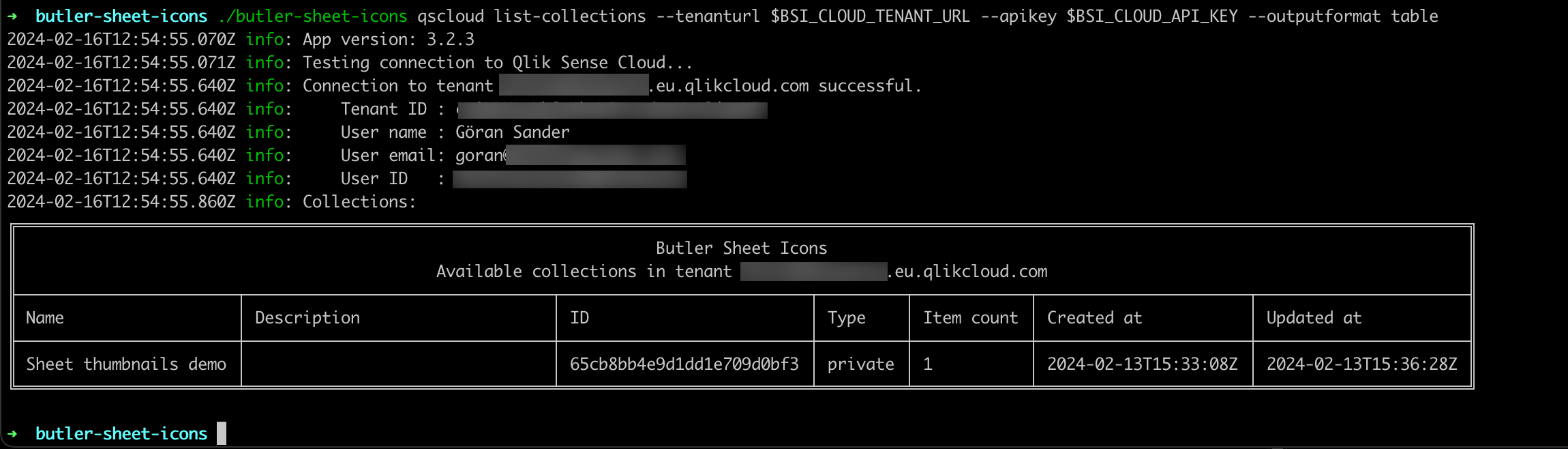
You can also get the output as JSON for programmatic use:
./butler-sheet-icons qscloud list-collections \
  --tenanturl mytenant.eu.qlikcloud.com \
  --apikey your-api-key \
--outputformat json.\butler-sheet-icons.exe qscloud list-collections `
--tenanturl mytenant.eu.qlikcloud.com `
--apikey your-api-key `
--outputformat jsonEnvironment Variables Example
For security and reusability, use environment variables to store sensitive information:
PowerShell Setup
# Set environment variables
$env:BSI_QSCLOUD_CST_TENANTURL = 'mytenant.eu.qlikcloud.com'
$env:BSI_QSCLOUD_CST_APIKEY = 'eyJhbGciOiJFUzM4NCIsImtpZCI6IjM...'
$env:BSI_QSCLOUD_CST_LOGON_USER_ID = '[email protected]'
$env:BSI_QSCLOUD_CST_LOGON_PWD = 'your-password'
$env:BSI_QSCLOUD_CST_APP_ID = '12345678-1234-1234-1234-123456789012'

# Run with minimal parameters
.\butler-sheet-icons.exe qscloud create-sheet-icons
Bash Setup
# Set environment variables
export BSI_QSCLOUD_CST_TENANTURL='mytenant.eu.qlikcloud.com'
export BSI_QSCLOUD_CST_APIKEY='eyJhbGciOiJFUzM4NCIsImtpZCI6IjM...'
export BSI_QSCLOUD_CST_LOGON_USER_ID='[email protected]'
export BSI_QSCLOUD_CST_LOGON_PWD='your-password'
export BSI_QSCLOUD_CST_APP_ID='12345678-1234-1234-1234-123456789012'

# Run with minimal parameters
./butler-sheet-icons qscloud create-sheet-icons
Advanced Filtering Example
Update apps in a collection with advanced sheet filtering and blurring:
./butler-sheet-icons qscloud create-sheet-icons \
  --tenanturl mytenant.eu.qlikcloud.com \
  --apikey $BSI_CLOUD_API_KEY \
  --logonuserid $BSI_CLOUD_LOGON_USERID \
  --logonpwd $BSI_CLOUD_LOGON_PWD \
  --collectionid your-collection-id \
  --exclude-sheet-number 1 \
  --exclude-sheet-title "Introduction" "Help" "About" \
  --exclude-sheet-status published \
  --blur-sheet-title "Financial Data" "Sensitive Info" \
  --blur-sheet-status private \
  --blur-factor 8 \
  --includesheetpart 2 \
  --pagewait 7 \
--loglevel info.\butler-sheet-icons.exe qscloud create-sheet-icons `
--tenanturl mytenant.eu.qlikcloud.com `
--apikey $env:BSI_CLOUD_API_KEY `
--logonuserid $env:BSI_CLOUD_LOGON_USERID `
--logonpwd $env:BSI_CLOUD_LOGON_PWD `
--collectionid your-collection-id `
--exclude-sheet-number 1 `
--exclude-sheet-title "Introduction" "Help" "About" `
--exclude-sheet-status published `
--blur-sheet-title "Financial Data" "Sensitive Info" `
--blur-sheet-status private `
--blur-factor 8 `
--includesheetpart 2 `
--pagewait 7 `
--loglevel infoThis command will:
- Update all apps in the specified collection
- Skip the first sheet in each app
- Skip sheets named "Introduction", "Help", or "About"
- Skip all published sheets
- Blur sheets named "Financial Data" or "Sensitive Info"
- Blur all private sheets
- Use blur factor 8 (medium blur)
- Include sheet content and title in thumbnails
- Wait 7 seconds for each sheet to load
Removing Sheet Icons
Remove all sheet icons from a specific app:
./butler-sheet-icons qscloud remove-sheet-icons \
  --tenanturl mytenant.eu.qlikcloud.com \
  --apikey your-api-key \
--appid 12345678-1234-1234-1234-123456789012.\butler-sheet-icons.exe qscloud remove-sheet-icons `
--tenanturl mytenant.eu.qlikcloud.com `
--apikey your-api-key `
--appid 12345678-1234-1234-1234-123456789012Or from all apps in a collection:
./butler-sheet-icons qscloud remove-sheet-icons \
  --tenanturl mytenant.eu.qlikcloud.com \
  --apikey your-api-key \
--collectionid your-collection-id.\butler-sheet-icons.exe qscloud remove-sheet-icons `
--tenanturl mytenant.eu.qlikcloud.com `
--apikey your-api-key `
--collectionid your-collection-idCommon Error Scenarios
Access Denied Error
If you try to update public or published sheets in a published app, you'll see an error like this:

Solution: Use the --exclude-sheet-status public published option for published apps.
API Key Issues
If your API key is invalid or expired:
Error: Unauthorized access. Please check your API key and permissions.Solution:
- Verify your API key is correct
- Check the key hasn't expired
- Ensure your user has access to the target apps
Login Issues
If SSO is interfering with the login process:
Error: Login page timeout. Could not complete authentication.Solution: Try using the --skip-login option:
./butler-sheet-icons qscloud create-sheet-icons \
  --skip-login \
  --tenanturl mytenant.eu.qlikcloud.com \
  --apikey your-api-key \
--appid your-app-id.\butler-sheet-icons.exe qscloud create-sheet-icons `
--skip-login `
--tenanturl mytenant.eu.qlikcloud.com `
--apikey your-api-key `
--appid your-app-idTips for Success
Test with Single Apps First: Before running collection-wide updates, test with a single app to verify your configuration.
Use Appropriate Wait Times: Complex sheets may need longer
--pagewaitvalues. Start with 5-7 seconds for complex dashboards.Monitor Published Apps: Remember that published apps have restrictions on which sheets can be updated.
Environment Variables: Use environment variables for credentials to keep them out of command history and scripts.
Logging Levels: Use
--loglevel debugfor troubleshooting,--loglevel infofor normal operation.Browser Options: If you encounter browser issues, try different browser versions using the
--browserand--browser-versionoptions.